
上一篇聊完了 RAG Agent 概念,這篇要接著往下開始實作,也就是使用者丟一個問題進來之後,RAG Agent 實際上是怎麼把它變成一個答案的。
這是同一套 Agent,處理兩種不同類型問題的實際 log:
問題一:「X50V9的規格?」
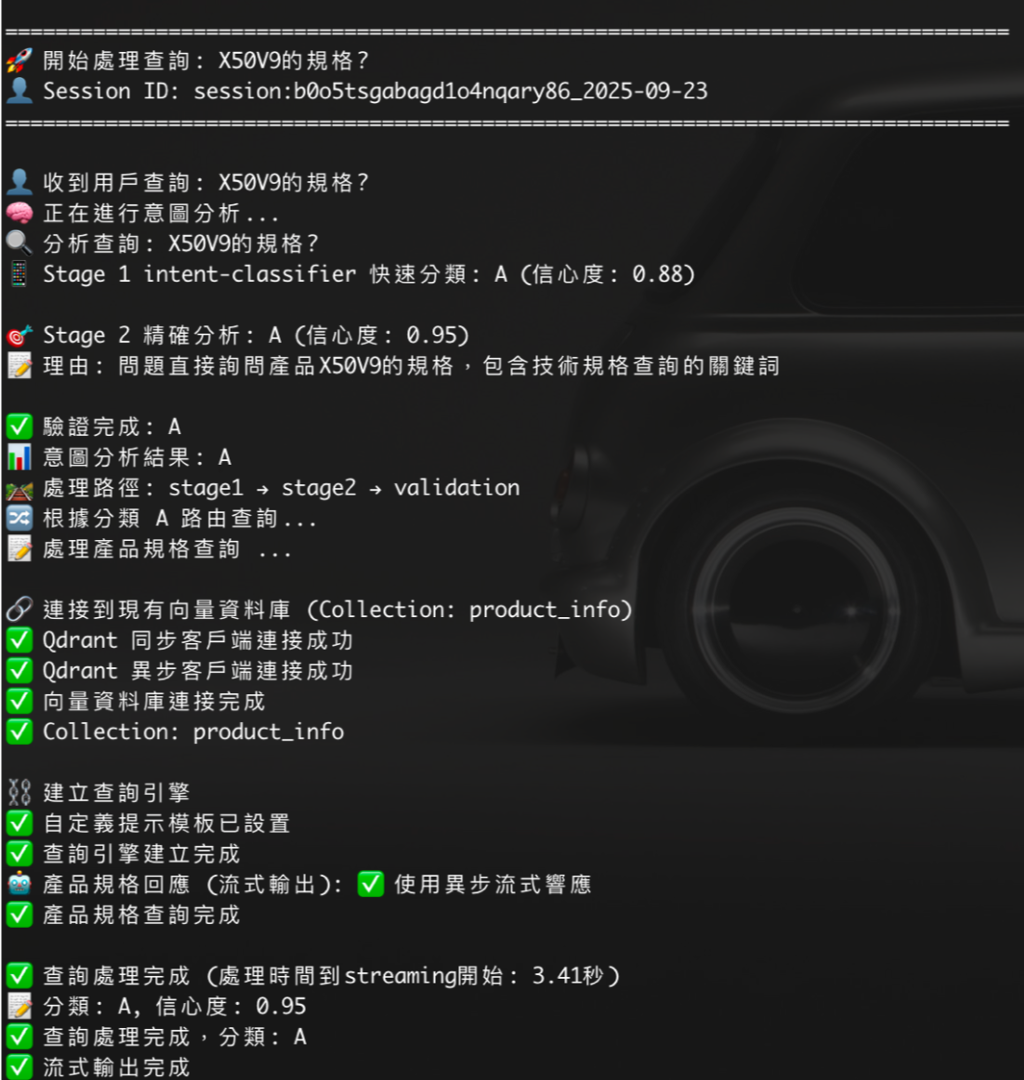
這種問法問得很細(型號 + 規格),意圖分析把它分類成 A,路由到 product_info 這個 collection——也就是上一篇說的 Info Pool,細粒度、負責精準命中。
問題二:「P55U的市場定位?」
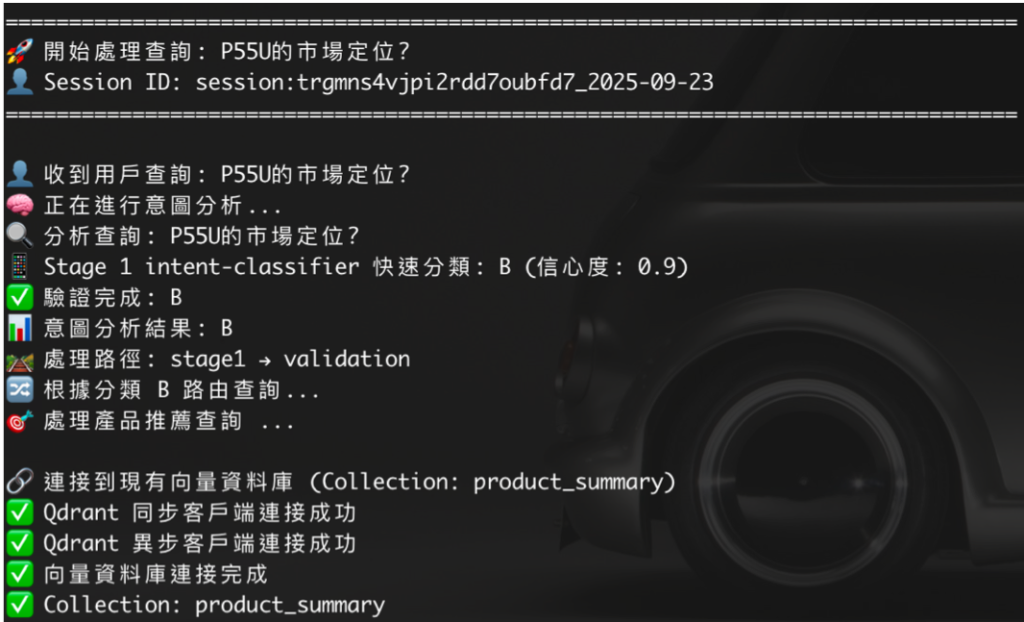
這種問法問的是比較概略的方向(市場定位、產品系列大概是什麼),分類成 B,路由到 product_summary——也就是 Summary Pool,摘要層級、負責大方向判斷。
兩個問題放在一起看,其實就是上一篇「為什麼要分 Info / Summary 兩個 Pool」這句話的具體實現:意圖分析的產出,決定了查詢端要打開哪一個 collection、用哪一把尺去量。 這篇要講的,就是打開 collection 之後,Agent 內部到底做了什麼事才生出最後那段回答。
把 RAGAgentStreamingV2.py 攤開來看,一次查詢大概會經過這幾層:
使用者問題
  → (前篇文章的意圖分析,決定要連哪個 collection)
  → 連接對應的 Qdrant collection
  → Retriever 撈候選 node(dense + BM25 sparse 混合檢索)
  → 後處理 pipeline(重新排序 / window 還原 / 相似度過濾 / LLM 二次排序)
  → 組裝成自訂 Prompt(含向量檢索片段 + 資料庫補回的精確資料)
  → LLM 生成答案,Streaming 逐 token 吐出
  → 全程記 log,方便除錯跟串接對話記憶
程式碼裡對應到的方法大致是這樣分工的:
| 方法 | 負責的事 |
|---|---|
initialize_components() |
準備 LLM、Embedding model,設定全域參數 |
connect_to_existing_vectorstore() |
接上已經建好的 Qdrant collection |
create_query_engine() |
組出 Retriever + 後處理 pipeline + 自訂 Prompt |
query_stream() / aquery_stream() |
真正執行查詢,同步/異步兩種 streaming |
rag-agent-demo/
├── requirements.txt       # 四個套件
├── rag_agent.py           # RAGAgent 類別本體(本篇要拆解的主角)
└── run_example.py         # 測試執行檔,串起完整查詢流程跑一輪對話
接下來把 rag_agent.py 一段一段拆開,每段先看程式碼,再講這段在解決什麼問題。
requirements.txt:安裝套件llama-index
llama-index-llms-ollama
llama-index-embeddings-ollama
llama-index-vector-stores-qdrant[fastembed]
跑之前要準備好的東西:
本機或內網有一個跑起來的 Ollama,並且已經 ollama pull 好一顆對話模型跟一顆 embedding 模型(embedding 模型要跟你建索引時用的那顆一致,兩邊對不上向量就白算了)。
一個跑起來的 Qdrant,裡面已經有一個 collection 存了向量資料——也就是上一篇文章那條 chunking + embedding pipeline 跑完之後的產出。
import asyncio
from typing import Generator, AsyncGenerator
from llama_index.core import Settings
from llama_index.llms.ollama import Ollama
from llama_index.embeddings.ollama import OllamaEmbedding
QDRANT_URL = "http://localhost:6333"
OLLAMA_BASE_URL = "http://localhost:11434"
LLM_MODEL = "ornith-1.5:9b"
EMBEDDING_MODEL = "embeddinggemma"  # 要跟建索引時用的模型一致

class RAGAgent:
    def __init__(self, collection_name: str = "product_info"):
        self.collection_name = collection_name
        self.llm = None
        self.embed_model = None
        self.sync_client = None
        self.async_client = None
        self.vector_store = None
        self.index = None
        self.query_engine = None

    def initialize_components(self):
        self.llm = Ollama(
            base_url=OLLAMA_BASE_URL,
            model=LLM_MODEL,
            temperature=0,
            disable_streaming=False,
        )
        self.embed_model = OllamaEmbedding(
            base_url=OLLAMA_BASE_URL,
            model_name=EMBEDDING_MODEL,
        )
        Settings.llm = self.llm
        Settings.embed_model = self.embed_model
        return self
temperature=0 求的是穩定輸出——問同一題,不要每次答案都不一樣。
import qdrant_client
from qdrant_client.async_qdrant_client import AsyncQdrantClient
from llama_index.vector_stores.qdrant import QdrantVectorStore
from llama_index.core import VectorStoreIndex, StorageContext

    def connect_to_existing_vectorstore(self, enable_hybrid: bool = False, enable_async: bool = True):
        self.sync_client = qdrant_client.QdrantClient(url=QDRANT_URL)
        if enable_async:
            self.async_client = AsyncQdrantClient(url=QDRANT_URL)

        kwargs = {"collection_name": self.collection_name, "client": self.sync_client}
        if enable_hybrid:
            kwargs.update({"enable_hybrid": True, "fastembed_sparse_model": "Qdrant/bm25"})
        if self.async_client:
            kwargs["aclient"] = self.async_client

        self.vector_store = QdrantVectorStore(**kwargs, prefer_grpc=True)
        storage_context = StorageContext.from_defaults(vector_store=self.vector_store)
        self.index = VectorStoreIndex.from_vector_store(
            vector_store=self.vector_store,
            storage_context=storage_context,
        )
        return self
這是整份程式碼裡最值得注意的架構決定:這個 Agent 完全沒有做 chunking、embedding 這些事,它只負責「連上去、查資料」。 切 chunk、產摘要、寫進 Qdrant 跟 MariaDB 的事情,是上一篇講的另一支獨立批次程式在做;查詢端跟資料處理端分開,可以分開部署、分開擴充,兩邊互不干擾。
幾個細節值得注意:
同步 + 異步兩個 client 都建:同步的用來做初始化檢查(確認 collection 存不存在),異步的留給後面 streaming 查詢用,避免異步查詢卡住整個 event loop。
enable_hybrid=True 開的是混合檢索:dense(語意向量)+ sparse(BM25 關鍵字比對)一起用。這點蠻重要——如果使用者問的是「X50V9」這種精確型號字串,單純的語意向量有時候反而抓不準(因為向量比的是語意相似度,不是字串精確比對),BM25 這種傳統關鍵字比對在這種情境下反而更可靠。兩者搭配,可以同時兼顧「語意相關」跟「關鍵字精準」。
有網路才開混合檢索:因為 BM25 稀疏模型第一次要下載,沒網路的話就先跳過,用純向量檢索頂著,不讓整個服務因為網路問題掛掉,這是個「優雅降級」的小細節。
Retriever + 後處理 pipeline撈回候選 node 之後,不是直接餵給 LLM,中間有一整條後處理 pipeline:
from llama_index.core.retrievers import VectorIndexRetriever
from llama_index.core.postprocessor import (
    LongContextReorder,
    MetadataReplacementPostProcessor,
    SimilarityPostprocessor,
    StructuredLLMRerank,
)
from llama_index.core.query_engine import RetrieverQueryEngine
from llama_index.core import get_response_synthesizer

    def create_query_engine(self, similarity_top_k: int = 5, use_reranker: bool = False, rerank_top_n: int = 3):
        retriever = VectorIndexRetriever(index=self.index, similarity_top_k=similarity_top_k)

        postprocessors = [LongContextReorder()]
        # 如果你的 chunk 是用 Sentence Window 切的,保留下面這行
        postprocessors.append(MetadataReplacementPostProcessor(target_metadata_key="window"))
        postprocessors.append(SimilarityPostprocessor(similarity_cutoff=0.3))

        if use_reranker:
            postprocessors.append(StructuredLLMRerank(llm=self.llm, top_n=rerank_top_n))

        self.query_engine = RetrieverQueryEngine(
            retriever=retriever,
            node_postprocessors=postprocessors,
            response_synthesizer=get_response_synthesizer(streaming=True, response_mode="compact"),
        )
        return self
每一個 postprocessor 在解決一個具體問題,拆開來看:
LongContextReorder():解決「lost in the middle」問題——LLM 對放在提示詞開頭跟結尾的內容比較敏感,中間的內容容易被忽略。這個 postprocessor 會把最相關的內容重新排到頭尾,而不是照原始分數順序排。MetadataReplacementPostProcessor(target_metadata_key="window"):這就是上一篇 Sentence Window 講的東西,在查詢端「反向操作」的地方。比對的時候用的是細粒度的單句向量,命中之後,這個 postprocessor 負責把單句換回 metadata 裡存的完整 window——也就是 Small-to-Big 真正落地執行的那一步。SimilarityPostprocessor(similarity_cutoff=0.3):把分數太低、明顯不相關的雜訊 node 直接過濾掉,不要讓它們混進最終要餵給 LLM 的內容裡面。StructuredLLMRerank(可選):向量相似度排序終究只是數學上的距離,不一定真的懂語意。這裡額外用一顆 LLM 對候選結果做二次排序,理論上更準,但也更貴、更慢,所以做成可選項。這條 pipeline 的順序其實有邏輯:先重排(避免頭重腳輕),再還原完整內容(window replace),再過濾雜訊,最後才是最貴的 LLM rerank——便宜、快的步驟放前面先篩一輪,貴的步驟留到最後、留給最少量的候選去跑。
from llama_index.core.prompts import PromptTemplate

        qa_prompt_tmpl = """
你是一個專業的產品諮詢助理。
請只根據下面「參考資料」回答問題,資料沒提到的內容一律誠實回答不知道。
遇到專有名詞請用簡單易懂的方式補充說明。

---------------------
參考資料:
{context_str}
---------------------
問題:{query_str}
回答:
"""
        self.query_engine.update_prompts(
            {"response_synthesizer:text_qa_template": PromptTemplate(qa_prompt_tmpl)}
        )
不要用 LlamaIndex 內建的預設 QA prompt。 內建的很通用,但通用就代表沒有針對你的業務場景做任何約束。想控制幻覺、想要求特定輸出格式、想要求「查不到就老實說不知道」,這些都得自己寫 prompt 去要求。上面這版是拿掉業務細節的簡化版,可以當起點自己往上加規則。
    def query_stream(self, question: str) -> Generator[str, None, None]:
        streaming_response = self.query_engine.query(question)
        for token in streaming_response.response_gen:
            yield token

    async def aquery_stream(self, question: str) -> AsyncGenerator[str, None]:
        if not self.async_client:
            for token in self.query_stream(question):
                yield token
                await asyncio.sleep(0.0001)
            return
        try:
            streaming_response = await self.query_engine.aquery(question)
            if hasattr(streaming_response, "async_response_gen"):
                async for token in streaming_response.async_response_gen():
                    yield token
            else:
                for token in streaming_response.response_gen:
                    yield token
                    await asyncio.sleep(0.0001)
        except Exception as e:
            print(f"⚠️ 異步查詢失敗,降級為同步查詢:{e}")
            response = self.query_engine.query(question)
            yield str(response)
這段的重點不是 streaming 本身怎麼做(這是 LlamaIndex 內建的能力),而是每一層都留了退路:
沒有異步 client → 直接退回同步 streaming,外面包一層 asyncio.sleep(0.0001) 假裝異步,避免真的卡住整個 event loop。
異步查詢丟例外 → except 接住,退回最普通的同步 query(),至少保證使用者拿得到答案,只是失去 streaming 效果。
這種「一路降級,但絕不讓使用者卡住拿不到任何回應」的設計,是做面向使用者的 RAG 服務時很值得學的讓步——比起追求每一次都要用到最完美的非同步 streaming,先確保「一定會有答案」更重要。
把上面幾段串起來,就是一支可以互動對話的測試腳本:
import asyncio
from rag_agent import RAGAgent


async def main():
    agent = RAGAgent(collection_name="product_info")
    agent.initialize_components()
    agent.connect_to_existing_vectorstore(enable_hybrid=True, enable_async=True)
    agent.create_query_engine(similarity_top_k=5, use_reranker=True, rerank_top_n=3)

    print("🚀 RAG Agent 已啟動!輸入 'quit'、'exit' 或 '退出' 來結束對話。")

    while True:
        try:
            user_input = input("\n👤 你: ").strip()
            if user_input.lower() in ["quit", "exit", "退出"]:
                print("👋 再見!")
                break
            if not user_input:
                continue

            print("🤖 助手: ", end="", flush=True)
            async for token in agent.aquery_stream(user_input):
                print(token, end="", flush=True)
            print()

        except KeyboardInterrupt:
            print("\n👋 再見!")
            break
        except Exception as e:
            print(f"❌ 錯誤: {str(e)}")


if __name__ == "__main__":
    asyncio.run(main())
initialize_components() → connect_to_existing_vectorstore() → create_query_engine(),這三步是初始化順序,缺一不可;跑起來之後,每一輪對話都會呼叫 aquery_stream(),逐 token 印出回答。四個套件裝完、Ollama 跟 Qdrant 起好,這樣一份應該就能直接跑起來、跟自己的資料對話了。
這篇的查詢端跟上一篇的資料層,其實是同一套 Small-to-Big 精神在兩端呼應:資料層負責把內容切成「小單位精準比對、大單位補完整」;查詢端則是負責把這個精神真正兌現 — 用 MetadataReplacementPostProcessor 把命中的小單位換回完整內容,用 Redis / MariaDB 補回結構化的精確資料,再靠一整條後處理 pipeline 跟自訂 Prompt,把這些東西組裝成一個真正靠得住的答案。



 iThome鐵人賽
 看影片追技術